MOODLE QUIZ · MANUAL GRADING
AI Grading for Moodle Quiz Essay Questions: How to Mark Open Answers Faster
Moodle marks nine of its ten question types instantly. The tenth waits for a human. Where the boundary sits, what it costs at scale, and how AI marking closes it.
By Eduface · Updated July 2026 · 9 min read
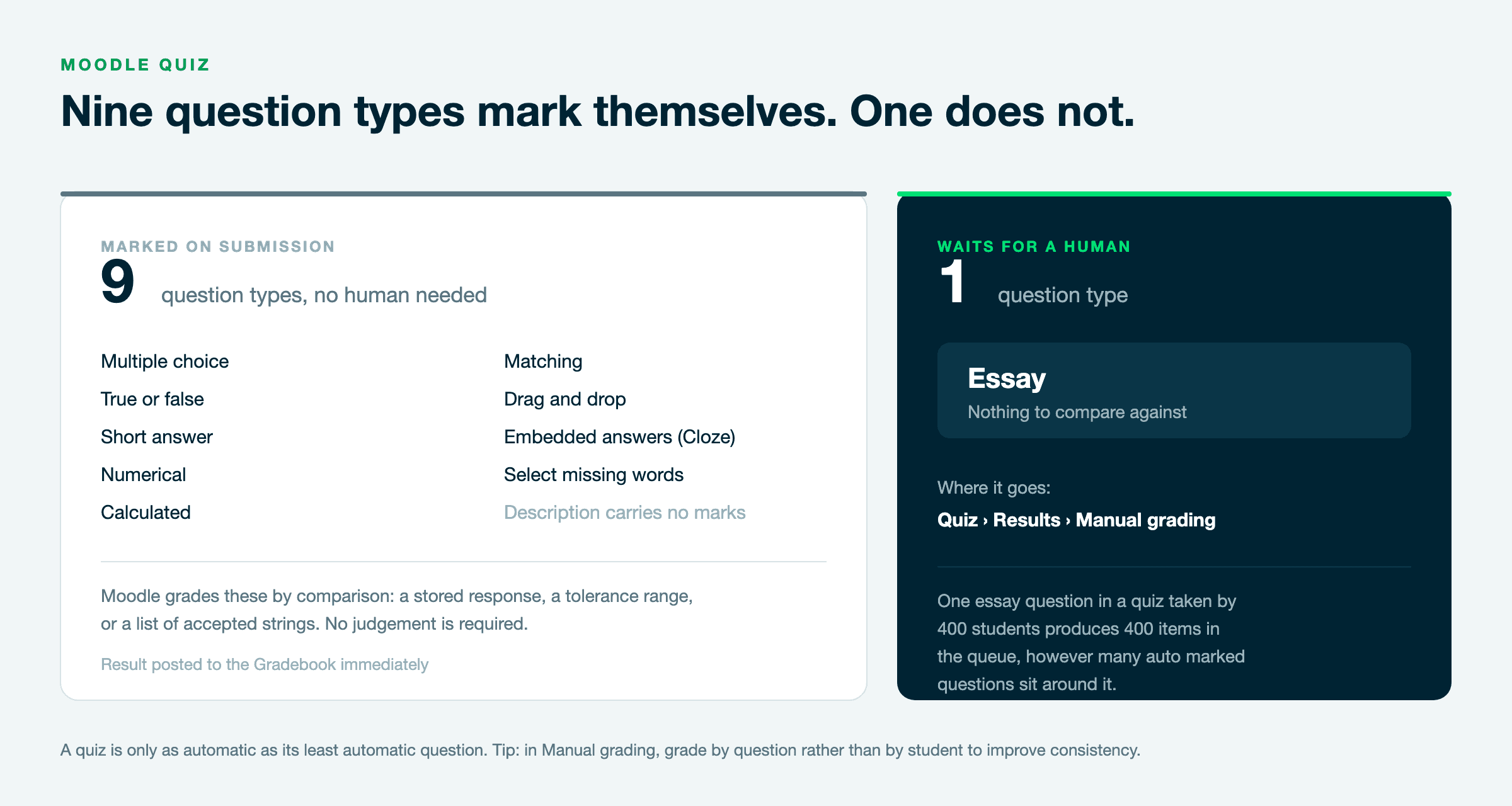
Moodle marks nine of its ten question types the moment a student presses submit. The tenth, the Essay question, waits for a human. This article explains exactly where that boundary sits, what it costs at cohort scale, and how AI assisted marking closes the gap without taking the decision away from the lecturer.
The short answer
Moodle has no native capability to mark Essay questions. Every open answer sits in the Manual grading queue until a marker opens it and types a score. AI assisted marking tools evaluate those answers against your grading scheme, propose a score with written reasoning per criterion, and hold everything in draft until the lecturer approves it. The lecturer stays the author of every grade that reaches the Gradebook.
Question types Moodle marks automatically
9
Question types Moodle leaves for a human
1, the Essay question
Where they wait
Quiz activity, Results tab, Manual grading
What AI assisted marking adds
A proposed score with reasoning per criterion
Who decides
The lecturer, on every single answer
Typical turnaround
Under 4 minutes per script
Why does Moodle not grade essay questions automatically?
Because Moodle grades by comparison, not by judgement. A multiple choice question has a stored correct response and Moodle checks whether the student picked it. A numerical question has a value and a tolerance. A short answer question has a list of accepted strings, optionally with wildcards.
An essay question has none of these. There is no stored string that a good answer must match, because two answers can use entirely different words, cite different authorities and still both deserve full marks. Moodle’s grading engine has nothing to compare against, so it does the only honest thing available to it: it records the response and marks the attempt as requiring grading. This is not a gap in Moodle. It is the correct behaviour for a system that does not attempt to read meaning.
Which Moodle question types need manual grading?
Only one, in a standard Moodle installation.
Question type
Auto?
Notes
Multiple choice
Yes
Single and multiple response
True or false
Yes
Short answer
Yes
Matches accepted strings, wildcards allowed
Numerical
Yes
Accepts a tolerance range
Calculated
Yes
Includes calculated simple and multichoice
Matching
Yes
Includes random short answer matching
Drag and drop
Yes
Onto image, into text, and markers
Embedded answers (Cloze)
Yes
Each embedded item follows its own type
Select missing words
Yes
Essay
No
Sits in Manual grading until a human scores it
Description
n/a
Carries no marks
Two practical consequences follow. First, a quiz is only as automatic as its weakest question. One essay question in a quiz taken by 400 students produces 400 items in the manual queue, regardless of how many auto marked questions sit around it.
Second, teams sometimes try to avoid the problem by rewriting essay questions as short answer questions with a long list of accepted strings. This almost always fails. It marks paraphrase as wrong, punishes students who write well, and quietly changes what the question assesses. If the learning outcome requires extended reasoning, the Essay question is the right instrument and the marking load is the price of validity.
What does manual quiz marking actually cost?
Work it out for your own cohort before deciding anything. The arithmetic is usually the argument. Take a 400 student module with four essay questions in the exam, at a conservative three minutes per answer.
400 students x 4 questions x 3 minutes = 80 hours
Eighty hours is two full working weeks for one marker, or a week spread across a team, which introduces the second problem. Marker variation in extended written work is well documented and grows with the number of markers, the length of the marking window, and the point in that window at which each script is read. The last hundred scripts are not marked by the same person who marked the first hundred, even when it is the same person.
Moodle gives you one good structural tool against this. In the Results tab, Manual grading lets you grade by question rather than by student, so a marker can read all 400 answers to question one in sequence before moving to question two. This is a real improvement in consistency and it is free. Use it whether or not you ever add an AI tool.
How does AI assisted marking work for open answers?
The workflow has four stages. The first three run entirely in draft, and the student sees nothing until the fourth is complete.
1. The grading scheme goes in first. You provide the same document a second marker would receive: the question, the model answer or indicative content, the mark allocation, and any rule about what earns credit. The quality of this input sets the ceiling on everything downstream. A grading scheme precise enough for a colleague is precise enough for a model. A vague one produces vague marking, exactly as it would with a human.
2. Each answer is marked three times, independently. The Eduface Exam Grader uses a three agent architecture designed to reproduce the rigour of double blind marking at scale. Three independent agents evaluate the same answer against the scheme without seeing each other’s results. A fourth agent then compares the three. Where they converge, confidence is recorded. Where they diverge, the answer is flagged and the reasoning behind each score is surfaced. That disagreement signal is the useful part: it tells a lecturer precisely where to spend attention, which is a better use of a marking hour than reading four hundred answers at equal depth.

3. Reasoning is attached to every score. Not a number on its own. Each proposed mark carries a written justification tied to the grading scheme, which is what makes the score reviewable rather than merely acceptable.
4. The lecturer approves, edits or overrides. Every score. There is no automatic release, no confidence threshold above which answers pass unreviewed, and no bulk accept that skips the reading. Approved grades pass back to the Moodle Gradebook automatically through LTI Assignment and Grade Services, with no manual re entry or data export.
A note on where the marking happens
Worth being precise about, because learning technologists will ask and most vendors are vague about it. An LTI 1.3 external tool is an activity in Moodle, in the same family as Assignment or Quiz. It is not a question type. That means an essay question sitting inside a Moodle Quiz is not itself routed through LTI the way a whole Assignment submission is.
In practice this shapes how you use the tool rather than whether you can. Where the open answer component is set up as its own assessment, the Exam Grader runs as an LTI activity and approved grades return to the Gradebook automatically. Where the open answers live inside a mixed quiz alongside auto marked questions, the routing depends on how that quiz is structured, and it is the first thing we work through in onboarding. If your exam currently runs as a Moodle Quiz with essay questions in it, tell us that at the start of the conversation. It changes the setup, and it is a much better question to settle in week one than in week six.
Does the lecturer still control the grade?
Yes, and this is worth being precise about, because it is the question an exam board will ask. The AI produces a recommendation. It has no route to the student. The lecturer sees the proposed score and its reasoning, changes anything they disagree with, and releases the result when they are satisfied. Nothing about that sequence is configurable, which is deliberate.
Two working modes are available. In visible mode the lecturer sees the proposed score before forming their own view, which is fastest. In blind mode the proposal is withheld until the lecturer has recorded their own judgement, which removes anchoring. Anchoring is a robust and well replicated finding: an initial number shifts a subsequent estimate even when the person knows it might be wrong. If your exam board is nervous about AI marking influencing academic judgement, blind mode is the direct answer to that concern, and it produces a comparison between the two judgements that is itself useful evidence.
What about the audit trail?
Every marker score, the reconciliation result, every lecturer edit and the release decision are logged and exportable. This matters twice. It matters when a student appeals, because the institution can show what was proposed, what was changed and by whom. And it matters under Regulation (EU) 2024/1689, where Article 12 sets out logging obligations for high risk AI systems and Annex III point 3 classifies systems used to evaluate learning outcomes as high risk. Following the Digital Omnibus amendments agreed in 2026, those obligations apply from 2 December 2027, while the Article 50 transparency obligations apply from 2 August 2026. Building to the requirement now rather than to the deadline is the cheaper path, and it is the one an inspection will reward.
How do you connect this to Moodle?
Eduface connects to Moodle as an LTI 1.3 external tool. There is no plugin to install, no server access, and no dependency on your Moodle version. The institution enters four values that Eduface supplies and returns the identifiers Moodle generates in response. Setup is typically one afternoon. The full field by field walkthrough is in our AI Essay Grader for Moodle article.
Frequently asked questions
Can Moodle automatically grade essay questions?
No. Moodle has no native capability to evaluate open answers. Essay questions are recorded and placed in the Manual grading queue in the Results tab of the quiz, where they wait for a human marker.
Is there a plugin that auto grades essay questions in Moodle?
Community plugins exist that attempt keyword or length based scoring for essay questions. They are not suitable for summative assessment because they reward surface features rather than reasoning. An LTI 1.3 tool that marks against your grading scheme and returns the reasoning is a different proposition, and it does not need to be installed inside Moodle.
How long does AI assisted marking take per script?
Under four minutes from upload to a proposed grade. Lecturer review time varies with cohort and how many answers are flagged for disagreement.
Does AI marking replace the second marker?
No. It changes what the second marker does. Instead of remarking a random sample, the second marker can concentrate on the answers where the system flagged disagreement, which is where marking error actually concentrates. Your institution’s moderation policy stays in force.
Can students see the AI generated score?
Not until a lecturer approves it. Scores are held in draft with no route to the student, and no setting changes this.
Does it work with our version of Moodle?
Yes. Because the connection uses LTI 1.3 rather than a plugin, Eduface has no dependency on any specific Moodle release. LTI 1.3 and Assignment and Grade Services are fully supported in Moodle 4.x and later, and future Moodle updates do not require anything from your IT team.
Which subject areas are covered?
Six academic fields are supported. Marking conventions differ by discipline in ways that generic writing evaluation misses, so the models are specialised rather than one size fits all.
Related reading
Best AI grading tools for Moodle in 2026
AI oral exams in Moodle: verify authorship without an AI detector
AI feedback on Moodle assignment drafts
Mark your next open answer exam with the lecturer still in charge
Eduface connects to Moodle via LTI 1.3 in one afternoon. Every score is approved by a lecturer before it reaches a student, every decision is logged, and student data stays in the EU.